
90%Revenue retained
Clipping: turn a scene into a path to purchase
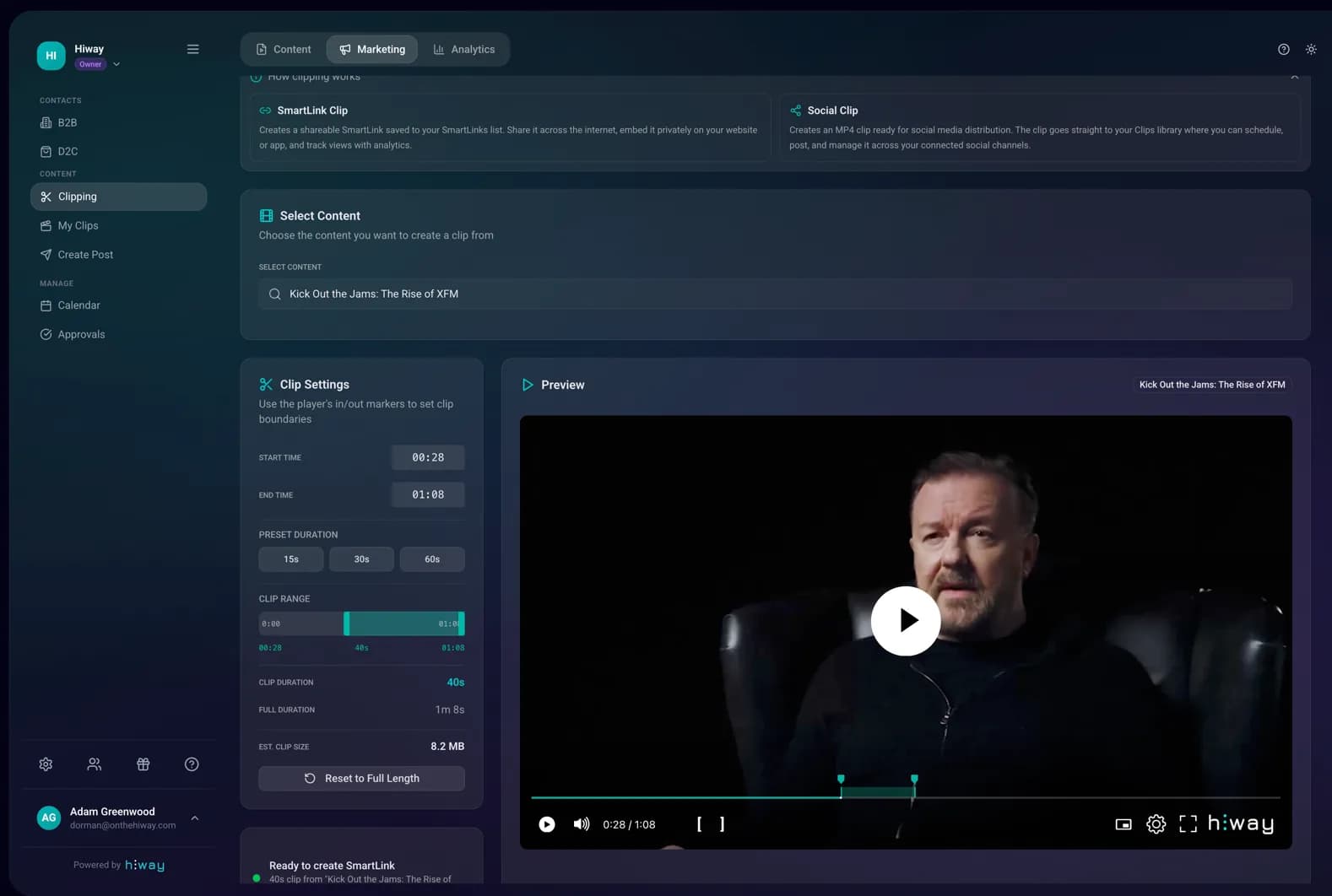
Cut a scene from a film, a documentary, a series or a live stream in one click. Every clip carries a SmartLink back to the paid title. Share it yourself, or let cast and fans share it for a cut.
- Cut and caption in the browser, with no external editor
- Every clip embeds a SmartLink to the full title
- Attribution shows which clip drove which sale
What Clipping does for you
Clip inside the platform
Scrub, cut, caption and export straight from the master. Clips are ready in minutes.
The clip is the shopfront
Each clip carries a SmartLink with the paywall, the price and the analytics attached.
Attribution built in
See which clip produced which sale, and give the person who shared it a cut.
From scene to sale
- 01
Pick the moment
Scrub the master in the browser and mark the in and out points.
- 02
Caption it
Add burned-in captions so the clip still lands in a silent autoplay feed.
- 03
Share it
Post it anywhere. The SmartLink travels inside the clip.
- 04
Pay the sharer
Set a share of any sale a collaborator drives. It pays out automatically.
Marketing that points at a checkout
Most film marketing sends people to a trailer, and the trailer sends them nowhere in particular. A clip with a SmartLink closes that gap. The viewer watches thirty seconds, taps once, and is inside the paid title. Nothing is re-uploaded and no separate landing page is needed.
Because the master already lives in Hiway, clipping does not mean exporting, re-encoding and re-uploading. The cut comes from the file that is already there. A live stream can be clipped while it is still running, which matters when a moment is worth sharing that night.
The interesting part is who does the sharing. Cast, crew, fans and creators can all share the same clip with attribution attached. When a share converts, the sharer earns their agreed cut at the point of sale. Hiway takes 10% of a pay-per-view sale, and every buyer lands in a CRM you own.
Clipping questions
What is clipping in Hiway?
Clipping cuts a short section out of a title you have already uploaded. The clip carries a SmartLink back to the full paid version, so a share becomes a route to a sale.
Do I need a video editor?
No. Clips are cut, captioned and exported in the browser from the master already in your account. There is nothing to download or re-upload.
Can other people share my clips?
Yes. Cast, fans and creators can share a clip with attribution attached. They earn an agreed share of any sale it drives, paid at the point of sale.
Can I clip a live stream?
Yes. A live stream can be clipped while it runs and after it ends. A moment can be shared the same night.
Try Clipping on your own title
The free account gives you 5 GB and every core feature. Plans start at £12 a month, and you keep 90% of every sale.